
A Microsoft obsession of thinking their (fantasy) customers would really love News.

Product managers are hallucinating and everyone (including me) complained about it. And on this post, I really want to show an example one important fantasy customer that Microsoft really wanted to enforce for years. (Spoiler: this has been ongoing for more than a decade).
First, I do appreciate people’s wildest reaction to this Microsoft CEO’s year-end remarks[1] of, as what the media summarized,[2] to stop people call AI “slop”. Consumers, well, decided to rename the whole company as the Microslop.[3]
To me, Microslop gives a better momentum to discuss about hallucination than the August’s Clippy movement by Louis Rossmann,[4][5] who is fighting on a slightly different side of the same battle. Be it pay-by-dignity or diminishing consumer rights, I do wonder why are there are still many executives, product managers, and surprisingly, academic researchers pledging their allegiance on the side of hallucination.
In Agile product development, product designers and managers are often trained to think about User Stories, the empirical representation of a (potential) customer’s need to be fulfilled by the product. I said “empirical” at this point because it is how User Stories should be done in a proper, accurate, and ethical manner. The format of a typical User Story is:
As a Chef, I want to be able to view current, unfinished orders from past to recent, so that I and our team can focus to finish the earliest orders first so customers can get their meals delivered fairly.
Except that companies can now exploit User Stories as a way to immerse real customers into artificial needs and artificial wants.
As an iPhone 6 owner, I want to be able to buy an iPhone 7, so that I could identify myself on Twitter as a proud “iPhone 6-7” owner.
User Stories can be as dramatic to the @ShitUserStory posts on X (x.com). But on this Microslop opportunity, I’d like to address an almost-invisible elephant in the room that is not Office 365.
That’s also, not Copilot.
In fact, that is the online portal existed since the late ‘90s: The Microsoft Network (MSN).
As a fantasy consumer persona of Microsoft products, I want to be able to see MSN everywhere and everytime, so that I could pretend like I love them all: I love Internet Explorer, Windows 8’s Live Tiles, Surface Duo with Microsoft Launcher; I love Outlook, Microsoft Start, Edge, and more.
If you know much about the Office/Copilot saga, then, MSN is essentially using the same marketing playbook. Back in the early days of Windows 11, Microsoft even tried to rename it as Microsoft Start. Then failed and returned to MSN. Sounds familiar, Microsoft Teams (work or school)?
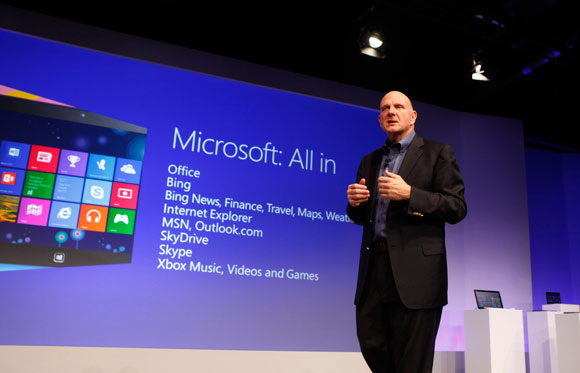
And back in the launch day of Windows 8, Ballmer was clearly, very excited to split the Bing/MSN news and lifestyle portal into a handful of dedicated apps:[7]
- Bing News
- Finance
- Travel
- Weather
- MSN (the Messenger)
- Games (like Solitaire)
Compare that with The New York Times, who now practically has just:
- The flagship New York Times app for various news categories,
- The Athletic, another flagship app for their Sports readers,
- NYT Cooking, a dedicated food recipe app,
- NYT Games, for Wordle and all those games,
- And a special NYT flagship app for Chinese-speaking audience.
In other words, Windows 8’s News, Finance, Weather, and Travel could have been in one single app. Unless they are a bit ahead of iOS 10 that finally have their dedicated News app.[8]
Microsoft still keeps slapping MSN (alongside the infamous Bing Wallpaper of the Day) in front of the people’s eyes, including:
- Microsoft Edge’s New Tab Page, from the early Spartan days to the age of Chromium.[9][10]
- Microsoft Launcher for Android (formerly Arrow Launcher, a Microsoft Garage project[11]). Arrow Launcher did not have a dedicated News tab until the project graduated from Microsoft Garage, with other gimmicks like live Cricket news as if you care.[12] And even Copilot was once there![13]
- In other words, Arrow Launcher was made for true productivity, then Microsoft Launcher was used to sell you Bing/MSN/Copilot content aside of Microsoft 365.
- Then these features disappeared again in 2025 for the goodness sake of keeping people productive.[14]
- Long live, true productivity.
- Outlook for Mobile used to have the Channels tab accessible alongside the regular Mail and Calendar.[15] Who really needs that?
- This is different from another tab called Feed that shows recent changes made by other users within the same Enterprise group[16]
- Just like Microsoft Launcher, both Channels and Feed feature has since been removed in 2025.
- Windows 8-10’s Live Tiles, where news content continue to be dynamically shown to people’s eyes, either they want it or not.[7]
- Fortunately, it is possible to turn of these Live Tiles, either individually,[17][18] or as system-wide via a Registry hack.[18][19]
- Windows 11’s Widgets has been riddled with OneDrive Photos, Traffic, News, Sports (like Cricket), and Games. And mostly nothing else.[20] Even though Spotify and then Facebook Messenger have supported the new Widgets platform, other major third party apps today like GitHub and Slack are not willing to bring theirs to Windows 11.
- Again, I feel this feature is more designed to sell you MSN and Copilot, rather than actual productivity.[21]
and my favorite, as a fantasy customer of Microsoft,
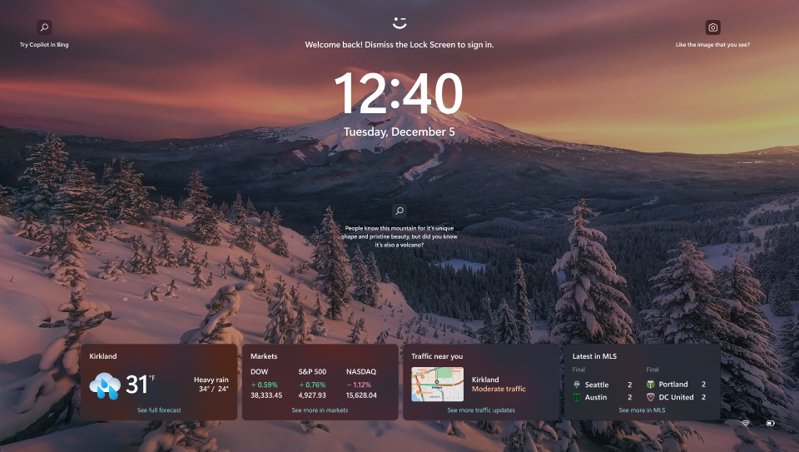
- Windows 11’s Lock Screen has been doomed with obligatory Bing Wallpaper of the Day, some MSN content (News, Sports, Stocks, Traffic, Weather, etc.), and actual ads for Microsoft 365, Microsoft Edge, Copilot, and Copilot+ PCs.[22]
Again, all of these features are set by default. That means when a customer finally bought a Copilot+ PC and have a Microsoft 365 Family subscription, they will still be likely to see ads on the lock screen for other things, like Microsoft Edge, Copilot, or another Clipchamp subscription.
Yeah, let’s keep slapping News on your lock screen.
As consumers, we can laugh at Microslop and their fantasy of “customers would love all those News.” It’s also the same “Chinese tech slop” where the folks behind HeyTap[note:1], Opera, and UC Browser are trying to slap some News, Cricket, Football, or “interesting videos” just to get a foothold of their great audience, like India.[23]–[26]
I cannot say much of MSN’s specific sources of revenue other than ads and in-app purchases within Solitaire.[27] But those “Chinese tech slop” are also doing ads, sponsored content, and affiliate links, too. Well, I could say they are copying a smaller-scale MSN for their platforms.
[note:1] HeyTap (brand.heytap.com) is a Chinese online content provider company powering Internet services, app stores, web browsers, and advertisements to other Chinese tech businesses, including ex-BBK companies OPPO and vivo.
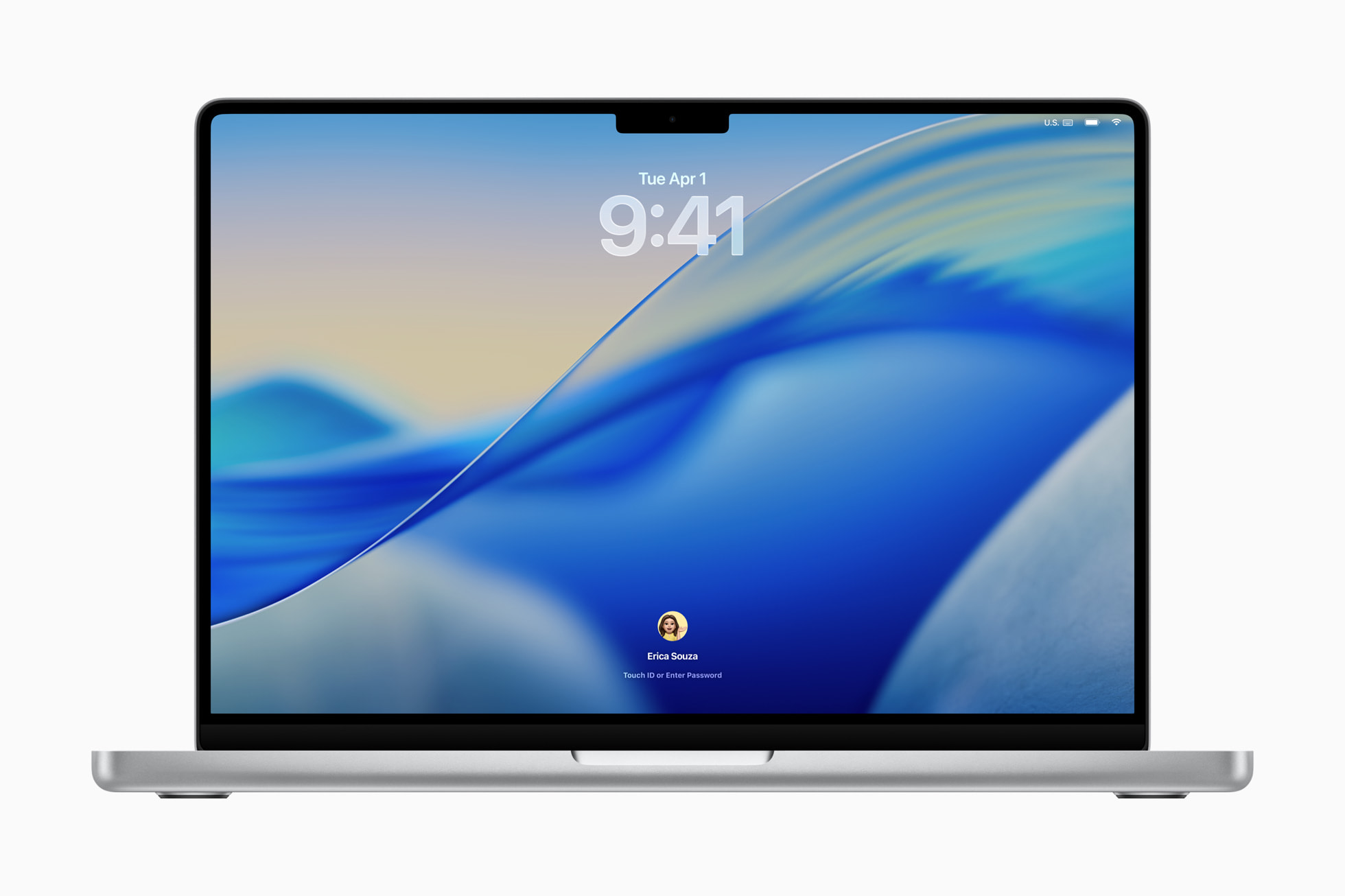
Meanwhile, let’s look at the Lock Screen in another universe. First, let’s look on a MacBook:[28]
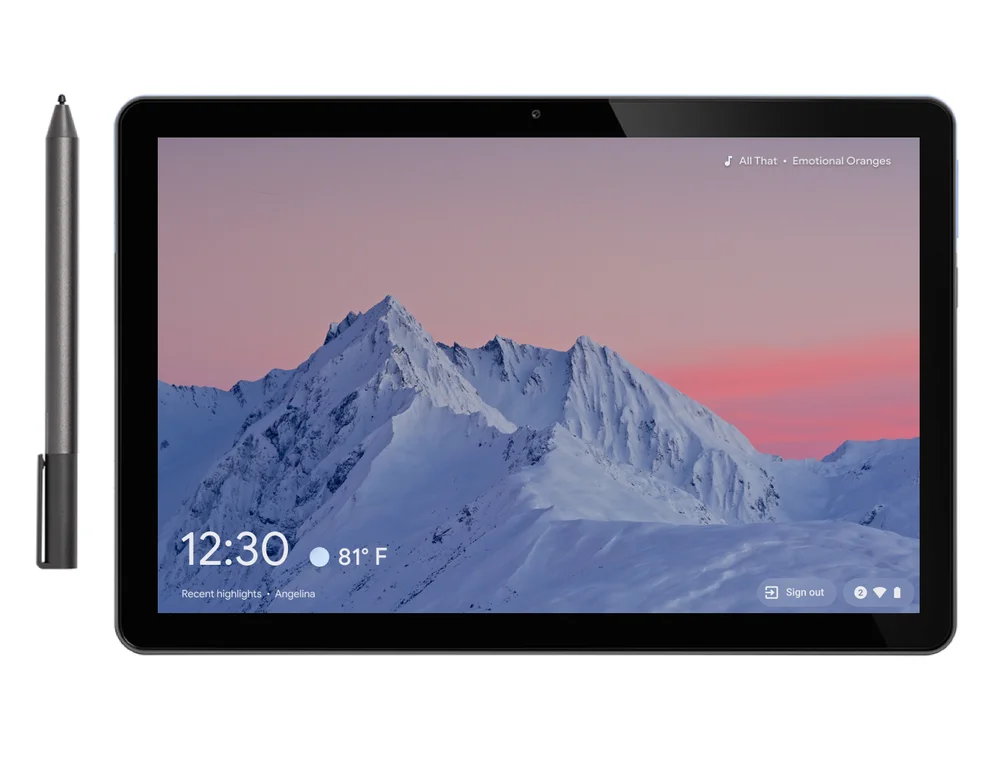
Then, on someone else’s Chromebook, which now looks a bit closer to Chromecast / Google Cast:[29]
And this is what you see on your recently purchased Windows 11 laptop. Three floating advertisement slots.[22][30] An array of MSN stuff that you cannot customize until a future version of Windows 11 which is still under testing as of this writing.[31] What a joke.
Even in Android and iPadOS, you can put some useful notifications on top of your minimalist background. That’s something that Microsoft still reluctant to do better since leaving Windows 10 Mobile away.
Therefore, to me, what Microsoft did in Windows 11 here is not just different from other platforms (and their fantasy customers), but is the same vision of the perfect, fantasy customer model that they have been advertising since the defaults in Windows Phone 7.
They have been waiting you on Start, on the New Tab, on the Widgets, and now, up to the Lock Screen.
References
- [1] "Looking Ahead to 2026" - Satya Nadella. sn scratchpad. https://snscratchpad.com/posts/looking-ahead-2026/ (2025-12-29).
- [2] "Microsoft’s Nadella wants us to stop thinking of AI as ‘slop’" - TechCrunch {Julie Bort}. https://techcrunch.com/2026/01/05/microsofts-nadella-wants-us-to-stop-thinking-of-ai-as-slop/ (2026-01-05).
- [3] ""Microslop" trends on social media — backlash to Microsoft's on-going AI obsession continues" - Windows Central {Jez Corden}. https://www.windowscentral.com/artificial-intelligence/microslop-trends-on-social-media-backlash-to-microsofts-on-going-ai-obsession-continues (2026-01-03).
- [4] "Change your profile picture to clippy. I'm serious" - Louis Rossmann. https://www.youtube.com/watch?v=2_Dtmpe9qaQ (2025-08-08). YouTube video.
- [5] "You Changed Your Profile to Clippy: Now What?📎📎📎" - Louis Rossman. https://www.youtube.com/watch?v=SkL9vzW7nY0 (2025-08-12). YouTube video.
- [6] "Shit User Story (@ShitUserStory)" - X.com. https://x.com/shituserstory (n.d, accessed 2026-01-08)
- [7] "Windows 8 Arrives" - Microsoft Corporation. Microsoft News Center (later Microsoft Source). https://news.microsoft.com/source/2012/10/25/windows-8-arrives/ (2012-10-25). Formerly https://www.microsoft.com/en-us/news/Press/2012/Oct12/10-25Windows8GAPR.aspx . Archived https://web.archive.org/web/20121026231823/http://www.microsoft.com/en-us/news/Press/2012/Oct12/10-25Windows8GAPR.aspx (2012-10-26).
- [8] "What’s new in iOS 10" - Apple Inc. Apple Newsroom. https://www.apple.com/newsroom/2016/09/whats-new-in-ios-10/ (2016-09-13).
- [9] "Introducing Project Spartan: The New Browser Built for Windows 10." - Microsoft Corporation {Joe Belfiore}. Windows Blogs. https://blogs.windows.com/windows-insider/2015/03/30/introducing-project-spartan-the-new-browser-built-for-windows-10/ (2015-05-30).
- [10] "How to customize the new browser tab pages in Microsoft Edge" - Microsoft Corporation. Microsoft Edge. https://www.microsoft.com/en-us/edge/learning-center/how-to-customize-your-browser-tab-pages/ (2025-06-12).
- [11] "Microsoft Garage: Arrow - a launcher for Android" - Microsoft Corporation. https://www.microsoft.com/en-us/garage/profiles/arrow/?msockid=2cafd81420946ec925abcecf216f6f64 (n.d, accessed 2026-01-08).
- [12] "Microsoft Launcher for Android brings live cricket action on your homescreen" - Microsoft Corporation {Bob Glancy}. Microsoft new Zealand News Centre. https://news.microsoft.com/en-nz/2019/05/09/microsoft-launcher-for-android-brings-live-cricket-action-on-your-homescreen/ (2019-05-09).
- [13] "Finally, Microsoft has successfully integrated Copilot AI into its Microsoft Launcher for Android smartphones" - Windows Central {Daniel Rubino}. https://www.windowscentral.com/software-apps/microsoft-finally-crams-copilot-ai-into-microsoft-launcher-for-android-smartphones (2024-05-28).
- [14] "News Feed gone" - u/Mind_Forsaken. Reddit (r/microsoftlauncher). https://www.reddit.com/r/microsoftlauncher/comments/1lzatvt/news_feed_gone/ (2025-14-07).
- [15] "Remove "Channels" add-in app" - Anonymous. Microsoft Learn > Q&A. https://learn.microsoft.com/en-us/answers/questions/4619530/remove-channels-add-in-app (2023-11-11).
- [16] "Microsoft Outlook for iOS and Android: The “Feed” tab will retire" - Microsoft Corporation. M365 Admin > Microsoft 365 Message Center Archives. https://m365admin.handsontek.net/microsoft-outlook-ios-android-feed-tab-will-retire/ (2025-02-28). Message ID: MC1019303.
- [17] "How to disable live tiles on the Windows 8 Start Screen" - BleepingComputer {Lawrence Abrams}. https://www.bleepingcomputer.com/tutorials/disable-live-tiles-in-windows-8/ (2012-10-17).
- [18] "How to disable all live tiles on Windows 10" - MSPowerUser {Michael Allison}. https://mspoweruser.com/disable-live-tiles-windows-10/ (2017-08-01).
- [19] "How to Enable or Disable Live Tile Notifications on Start in Windows 10" - Shawn Brink. Windows TenForums. https://www.tenforums.com/tutorials/50834-enable-disable-live-tiles-start-windows-10-a.html (2020-02-26).
- [20] "Stay up to date with widgets" - Microsoft Corporation. https://www.microsoft.com/en-us/windows/tips/widgets (n.d, accessed 2026-01-08).
- [21] "Microsoft won’t give up on Windows 11’s Widgets board as it gets another UI makeover" - Windows Latest {Abhijith M B}. https://www.windowslatest.com/2025/10/20/microsoft-wont-give-up-on-windows-11s-widgets-board-as-it-gets-another-ui-makeover/ (2025-10-20).
- [22] "Customize the Lock Screen in Windows" - Microsoft Corporation. https://support.microsoft.com/en-us/windows/customize-the-lock-screen-in-windows-81dab9b0-35cf-887c-84a0-6de8ef72bea0 (n.d, accessed 2026-01-08).
- [23] "Opera Mini" - Opera Norway. https://www.opera.com/mini (n.d, accessed 2026-01-08).
- [24] "Improve your digital life with Android Browser" - UCWEB. UC Browser. https://www.ucweb.com/download/android (n.d, accessed 2026-01-08).
- [25] "UC Browser brings alive cricket frenzy with UC Cricket." - Spoortskeeda. https://www.sportskeeda.com/cricket/uc-browser-brings-alive-cricket-frenzy-with-uc-cricket (2015-04-13).
- [26] "HeyTap Browser" - HeyTap. Google Play Store. https://play.google.com/store/apps/details?id=com.heytap.browser (n.d, accessed 2026-01-08).
- [27] "Microsoft’s Solitaire subscription expands to Minesweeper and beyond" - PCWorld {Mark Hachman}. https://www.pcworld.com/article/2820462/microsofts-solitaire-subscription-expands-to-minesweeper-and-beyond.html (2025-06-24).
- [28] "macOS Tahoe 26 makes the Mac more capable, productive, and intelligent than ever" - Apple Inc. Apple Newsroom. https://www.apple.com/newsroom/2025/06/macos-tahoe-26-makes-the-mac-more-capable-productive-and-intelligent-than-ever/ (2025-06-10).
- [29] "Sign in to sites faster and personalize your lock screen" - Google LLC. {Alexander Kuscher}. https://blog.google/products-and-platforms/devices/chromebooks/sign-sites-faster-and-personalize-your-lock-screen/ (2021-01-26).
- [30] "February 25, 2025—KB5052093 (OS Build 26100.3323) Preview" - Microsoft Corporation. https://support.microsoft.com/en-gb/topic/february-25-2025-kb5052093-os-build-26100-3323-preview-053856ea-f984-4bdb-866c-5f356f5a451b (2025-02-25).
- [31] "Announcing Windows 11 Insider Preview Build 27982 (Canary Channel)" - Microsoft Corporation {Windows Insider Program Team}. https://blogs.windows.com/windows-insider/2025/11/04/announcing-windows-11-insider-preview-build-27982-canary-channel/ (2025-11-04).
You should also read:
Project Spartan is now Microsoft Edge!
[gallery] Even though there are problems while viewing some pages such as Google+ on Spartan, the fixed name for the project Spartan is Edge. Still do not have any idea why it is called Edge, not IE12 such as from Opera Next to Opera Beta,…
Continue reading...The new shells you'll love.
This year marks the 5th anniversary of the original launch of reinhart1010.id, and also the infamous star of the sites! That's why this year we decided to refresh the characters into something that you'll love: You'll see these heavily improved from the previous designs (2024),…
Continue reading...Product managers are hallucinating on their consumers. Leave them alone.
Executive Summary: Updated 2026-01-08: Added sections describing the Disney Adult Effect. It has been years since the news that people surprisingly decided not to upgrade their PCs to Windows 11. Or that Edge browser that now shares some code with Google Chrome. Or Copilot+ PCs…
Continue reading...